Skip to content
Wagtail ClimWeb Documentation
  • En
  • Fr
  • Sw
  • Es
  • Pt
  • Am
  • Ar
  • Introduction
  • Rationale
  • Technology
  • Pilot Phase
  • Find Your Way Around
  • Pages
    • Organisation Pages
      • About Page
      • Partners Page
      • Projects
      • Tenders
      • Vacancies
    • Products
    • Services
    • News
    • Publications
    • Flexible Pages (Flex Page)
  • Configure Settings
    • Homepage Map Settings
    • Two-Factor Authentication (2FA)
    • Base Settings
    • Menus
    • Google Translate Languages
    • Navigation Settings
    • Important Pages
    • Satellite Imagery Settings
    • Themes
    • Users & Roles
    • Workflows
  • Content Assets
    • Images
    • Documents
    • Collections
    • Snippets
    • Surveys
    • Forms
  • CAPComposer (CAP Alerts)
    • CAPComposer Features
    • CAPComposer Base Settings
    • Setting Boundaries
    • CAP Composer and Approver Roles and Publishing Workflows
    • Creating CAP Alerts
    • Generating PNG/PDF
    • CAP Alert Statistics
  • City Forecasts
  • Mapviewer
  • Atlas | Interactive Dashboards
    • Creating Dashboard Gallery
    • Creating a Dashboard Page
    • Creating Reusable Maps and Charts (Snippets)
    • Block Layout Rules
    • FAQs
    • Troubleshooting
  • Mailing Integrations
  • Translations Contribution Guide
  • Frequently Asked Questions (FAQs)
  • Technical Guides
    • Development
      • Running the dev environment
      • ./dev.sh
      • Environment Variables
      • Directory Structure
      • Development tools
    • General Architecture
    • Backup and Restore Guide
    • Management Commands
    • Extending Climweb
      • Plugin Overview
      • Plugin Installation
      • Creating a Plugin
      • Plugin Boilerplate
  1. Docs
  2. Configure Settings
  3. Navigation Settings
Edit on GitHub View source

Navigation Settings

Purpose

This panel defines the public site’s top main menu and footer menu.

To open it: Settings → Navigation Setting.

Screenshot
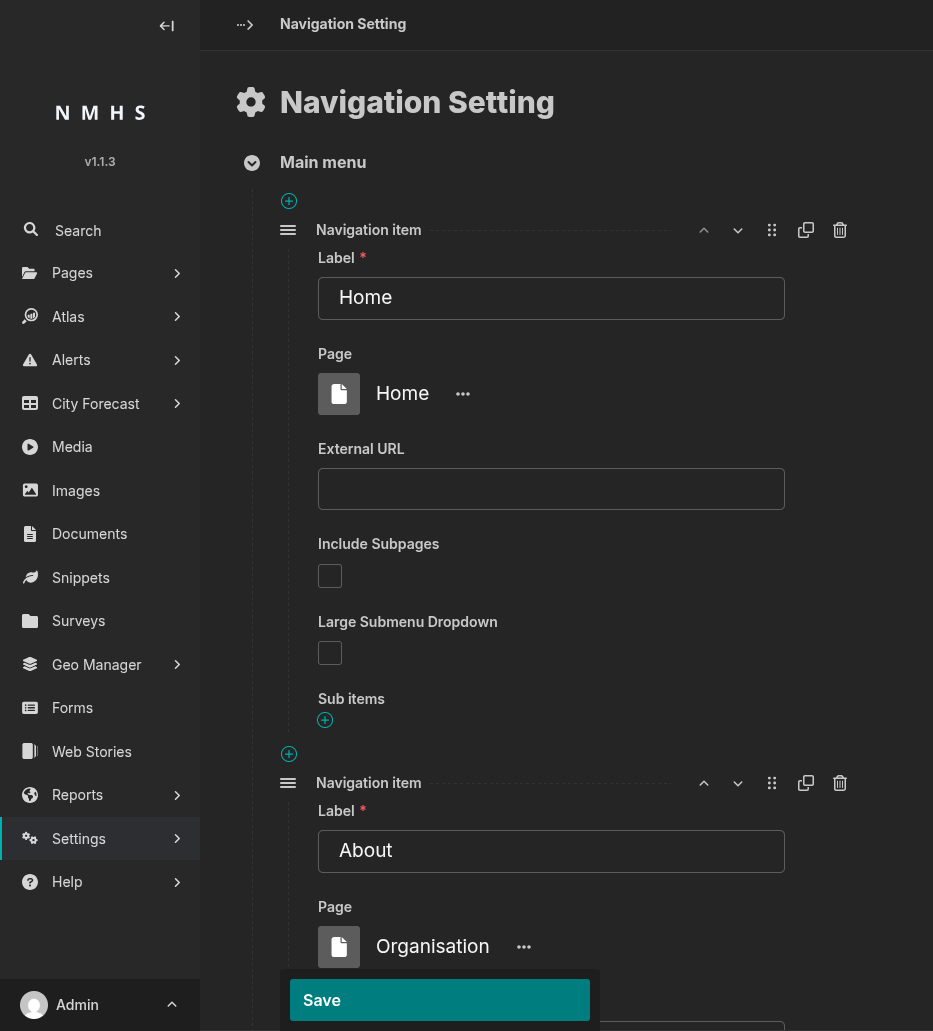
Navigation Settings

Field Reference

Navigation item (main menu and footer menu)

Field

Type

Required

Description

Label

Text

Yes

Text shown for this menu entry.

Page

Page chooser

No

Internal page to link to. Leave blank to use an external URL instead.

External URL

URL

No

External link target, used only if Page is blank.

Include Subpages

Boolean

No

If checked and Page is set, that page’s children are automatically rendered as a dropdown (children must be live and have Show in menus checked to appear).

Large Submenu Dropdown

Boolean

No

Renders the dropdown as a wide multi-column panel instead of a compact list.

Sub items

Repeatable block

No

Manually curated children of this menu item (fields below).

In the footer menu, an item only appears on the site if it has sub-items (from this field or from Include Subpages) — a footer item with just a Label and a link, and no sub-items, will not show up.

Sub item

Field

Type

Required

Description

Label

Text

Yes

Display text for the sub-item.

Page

Page chooser

No

Internal page to link to.

External URL

URL

No

External link target, used only if Page is blank.

Show as action button

Boolean

No

Footer menu only: renders as a visually distinct call-to-action button instead of a plain link (e.g. “Open Mapviewer”). No effect in the main menu.

An item needs either Page or External URL to link anywhere.

← Google Translate Languages Important Pages  →

Page contents

  • Navigation Settings
    • Purpose
    • Screenshot
    • Field Reference
      • Navigation item (main menu and footer menu)
      • Sub item
  • Demo
  • Packages
  • Developers
© Copyright 2026, WMO Regional Office For Africa
Last updated: Jul 16, 2026 Created using Sphinx Wagtail Theme 6.6.0 and Sphinx 9.0.4