Skip to content
Wagtail ClimWeb Documentation
  • En
  • Fr
  • Sw
  • Es
  • Pt
  • Am
  • Ar
  • Introdução
  • Justificativa
  • Tecnologia
  • Fase Piloto
  • Encontre o seu caminho
  • Páginas
    • Páginas da organização
      • Sobre a página
      • Página de parceiros
      • Projetos
      • Propostas
      • Vagas
    • Produtos
    • Serviços
    • Notícias
    • Publicações
    • Páginas flexíveis (página flexível)
  • Definir configurações
    • Configurações do mapa da página inicial
    • Autenticação de dois fatores (2FA)
    • Configurações básicas
    • Cardápios
    • Google Translate Languages
    • AI Assistant
    • Navigation Settings
    • Important Pages
    • Satellite Imagery Settings
    • Temas
    • Usuários e funções
    • Fluxos de trabalho
  • Ativos de conteúdo
    • Imagens
    • Documentos
    • Coleções
    • Trechos
    • Pesquisas
    • Formulários
  • CAPComposer (Alertas CAP)
    • Recursos do CAPComposer
    • Configurações básicas do CAPComposer
    • Definindo Limites
    • Funções de compositor e aprovador do CAP e fluxos de trabalho de publicação
    • Criação de alertas CAP
    • Gerando PNG/PDF
    • CAP Alert Statistics
  • Previsões da cidade
  • Visualizador de mapas
  • Atlas | Painéis interativos
    • Criando Galeria de Painéis
    • Criando uma página do painel
    • Criação de mapas e gráficos reutilizáveis ​​(snippets)
    • Regras de layout de bloco
    • Perguntas frequentes
    • Solução de problemas
  • Integrações de correspondência
  • Translations Contribution Guide
  • Perguntas frequentes (FAQ)
  • Guias Técnicos
    • Desenvolvimento
      • Executando o ambiente de desenvolvimento
      • ./dev.sh
      • Variáveis ​​de ambiente
      • Estrutura de diretório
      • Ferramentas de desenvolvimento
    • Arquitetura Geral
    • Guia de backup e restauração
    • Comandos de gerenciamento
    • Estendendo o Climweb
      • Visão geral do plug-in
      • Instalação do plug-in
      • Criando um plug-in
      • Padrão de plug-in
  1. Docs
  2. Definir configurações
  3. Navigation Settings
Edit on GitHub View source

Navigation Settings

Purpose

This panel defines the public site’s top main menu and footer menu.

To open it: Settings → Navigation Setting.

Screenshot
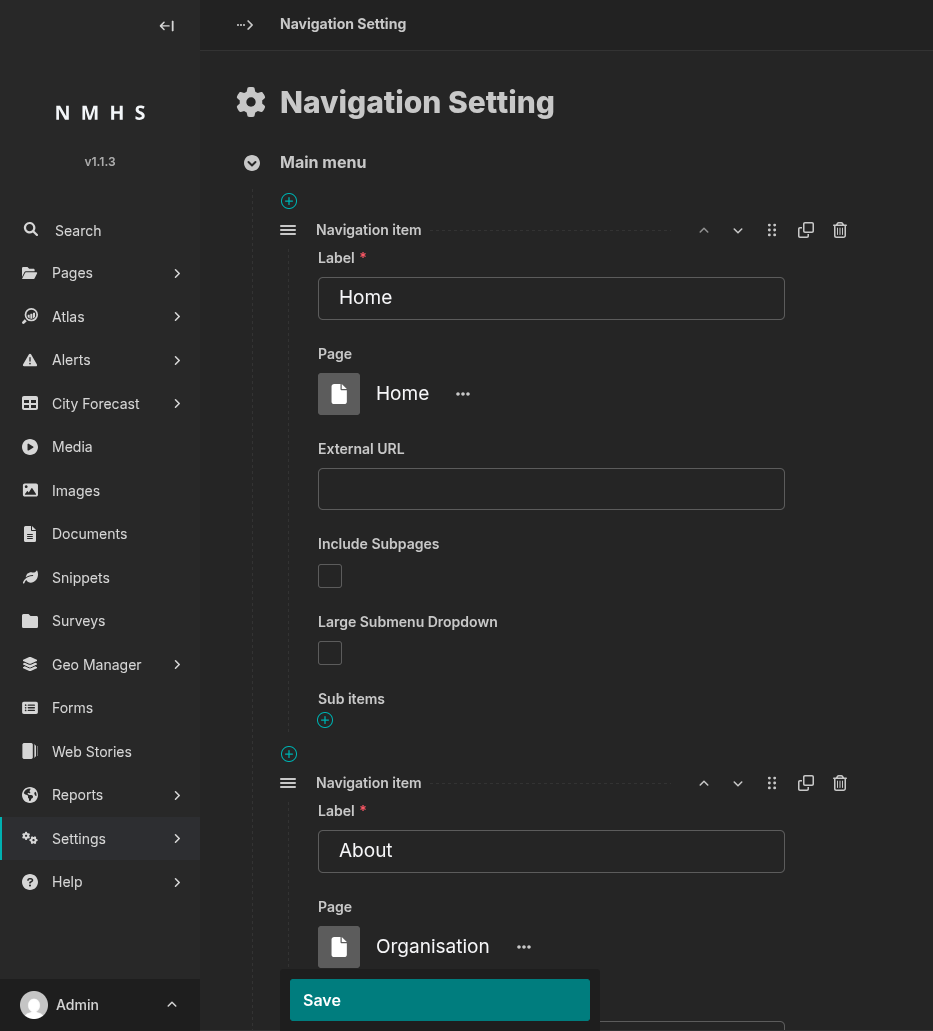
Navigation Settings

Field Reference

Navigation item (main menu and footer menu)

Field

Tipo

Obrigatório

Descrição

Label

Text

Yes

Text shown for this menu entry.

Page

Page chooser

No

Internal page to link to. Leave blank to use an external URL instead.

External URL

URL

No

External link target, used only if Page is blank.

Include Subpages

Booleano

No

If checked and Page is set, that page’s children are automatically rendered as a dropdown (children must be live and have Show in menus checked to appear).

Large Submenu Dropdown

Booleano

No

Renders the dropdown as a wide multi-column panel instead of a compact list.

Sub items

Repeatable block

No

Manually curated children of this menu item (fields below).

In the footer menu, an item only appears on the site if it has sub-items (from this field or from Include Subpages) — a footer item with just a Label and a link, and no sub-items, will not show up.

Sub item

Field

Tipo

Obrigatório

Descrição

Label

Text

Yes

Display text for the sub-item.

Page

Page chooser

No

Internal page to link to.

External URL

URL

No

External link target, used only if Page is blank.

Show as action button

Booleano

No

Footer menu only: renders as a visually distinct call-to-action button instead of a plain link (e.g. «Open Mapviewer»). No effect in the main menu.

An item needs either Page or External URL to link anywhere.

← AI Assistant Important Pages  →

Page contents

  • Navigation Settings
    • Purpose
    • Screenshot
    • Field Reference
      • Navigation item (main menu and footer menu)
      • Sub item
  • Demo
  • Packages
  • Developers
© Copyright 2026, WMO Regional Office For Africa
Last updated: jul. 20, 2026 Created using Sphinx Wagtail Theme 6.6.0 and Sphinx 9.0.4